Find a complete answer before choosing a clip length
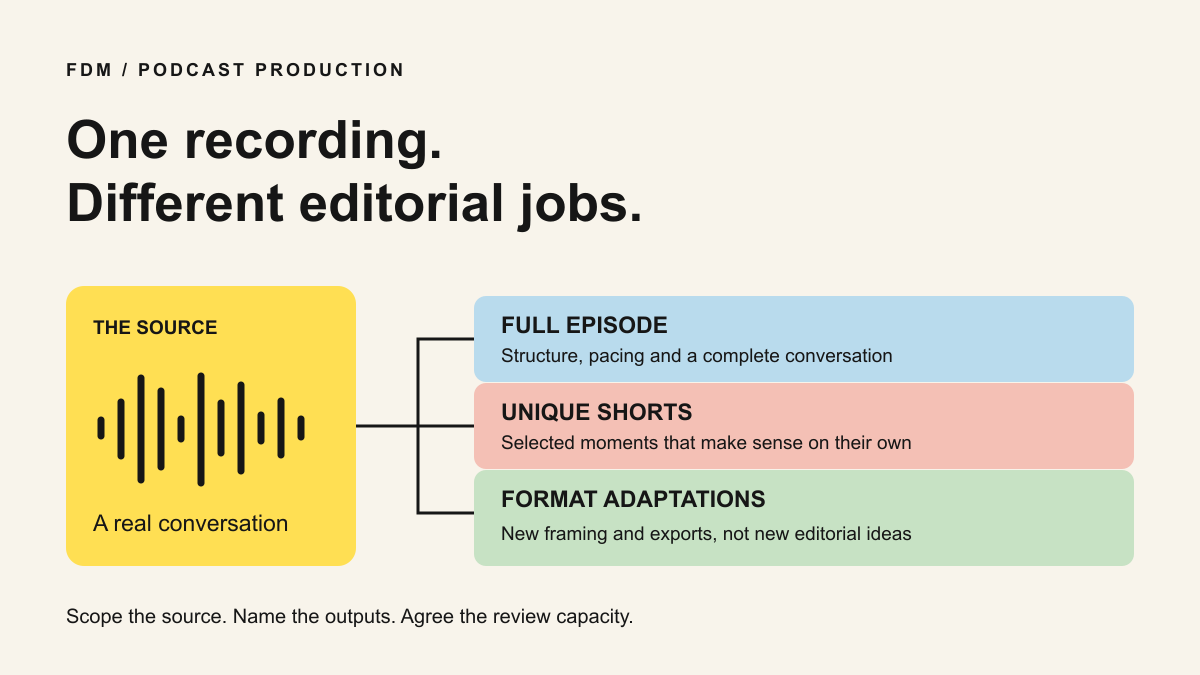
To turn a long podcast into useful shorts, find an answer a new viewer can understand, keep the setup and qualifications it needs, then shape a clear opening and ending. Check the source audio, captions and framing before approving it. A lively sentence is a candidate, not yet a finished clip.
Podcasts create a particular editing problem: the meaning often sits between two people. A guest says “yes, but only in that case” because the host has just described a condition. Removing the host can make the guest sound more certain than they were. The editor has to reconstruct a followable exchange without reconstructing the speaker’s opinion.
This guide is an FDM editorial method with a fictional worked example. It is not a promise that a recording yields a fixed number of shorts or that a particular opening earns more views. For package scope and monthly capacity, use our separate podcast-retainer guide.
Sources: FDM: What a podcast-editing retainer should include
Listen for the question behind the answer
Review the conversation once for meaning before pulling fragments from a transcript. Mark passages where the guest explains a decision, challenges an assumption, gives an example or describes a mistake. Write the question each passage answers in ordinary language. “Product adoption” is a topic; “Why do new users stop before inviting a colleague?” is a question.
Keep a little source material before and after each candidate. Check whether a pronoun points to something outside the selection, whether a laugh changes the tone and whether the following sentence limits the claim. Transcripts and automated selection tools can help locate candidates, but the recording is the reference for what was actually said.
For a two-person exchange, decide whether the host’s question is necessary, whether a faithful on-screen question can supply the setup, or whether the answer simply cannot stand alone. Do not add narration that fills a factual gap the guest never resolved. Hold that candidate for clarification instead.
Worked example: the line you should not cut
The following conversation and timestamps are invented for this worksheet. They are not quotations from a client or performance evidence. Imagine a SaaS podcast discussing a workspace invitation flow.
At source 12:04–12:12, the host asks: “Should teams remove setup steps to get people to their first useful action?” At 12:12–12:30, the guest says: “Only when those steps are genuinely optional. We still need the right permissions before someone invites a colleague.” At 12:30–12:50, the guest describes moving an optional profile question later. At 12:50–13:02, they add: “That does not mean skipping access checks.”
A misleading cut starts with the optional-step example and titles it “Remove setup to fix onboarding.” It has turned a limited suggestion into general advice. A more faithful opening is the editorial question “Which setup steps can wait?” followed by the condition, the example and the access-check boundary.
The worksheet below maps those four source passages to a proposed 50-second edit after trimming pauses. Those final timings are an illustrative plan, not a measured export. An editor must conform the map to the actual finished file. Do not force the real speaker into this duration or reorder words to create a statement they did not make.
Make the opening specific without overstating it
Try the first sentence on someone who did not hear the episode. Can they identify what is being discussed? If not, include the host’s question, retain a little more of the guest’s setup or add an accurate editorial title. A title is a useful way to frame a question, but it should not masquerade as a verbatim quote.
Distinguish a speaker’s experience from general advice. “What happened in our rollout” is not “What every SaaS team should do.” For expert health conversations, keep the conditions and uncertainty with the statement they qualify. The client’s authorised subject reviewer should decide whether the excerpt preserves the intended meaning; an editor is not a clinical approver.
Remove an irrelevant detour if the answer survives without it. Keep a pause when it helps the thought land. Covering every cut with a zoom or sound effect can make an explanation harder to follow. The first review should establish that the answer is intact before debating the decorative treatment.
Frame the conversation, not just the face
A vertical version may need speaker-aware reframing rather than a fixed centre crop. Check both participants when they react, interrupt or refer to something visible. A software screen may need its own readable shot instead of being squeezed beside two faces. Plan those choices around the explanation.
Preview the actual destination on a phone. Check that platform controls do not cover names, captions or an important label. Platform eligibility and runtime limits change, so confirm them with the destination’s current documentation. YouTube’s Shorts guidance is linked below; its maximum duration is not a target length for every answer.
Watch once with sound off to inspect the captions and visual context, then with sound on to catch abrupt joins, overlapping speech and changes in tone. The silent check does not replace the audio check. Avoid music that makes a careful explanation sound like an emergency or obscures words.
Check the details an automatic transcript can miss
W3C explains that captions include relevant speech and non-speech audio and that automatic captions need accuracy checks. Verify speaker names, product names, negatives and numbers against the recording. A missing “not” can reverse the point. Keep readable line breaks and avoid placing captions over essential product labels.
Retain an episode identifier and original source in/out points for every short. If the edit uses several passages, record each one in order. Source time is measured against the named original recording; final time is measured against the delivered clip. Mixing those two clocks makes corrections unnecessarily difficult.
Before release, confirm permission for the guest, recording, third-party material and intended reuse. Remove private comments, contact details or unreleased information. A recorded interview is not blanket permission to publish every aside in it. Send uncertain claims or permissions back to the client before export approval.
Sources: W3C: Captions and subtitles
How to evaluate a podcast-clipping editor
Ask for one representative paid test if you need to assess fit. Give the editor a real recording under agreed access and usage terms, the intended audience and any sensitive topics. Ask them to propose a selection and explain one passage they would reject. Their reasoning matters as much as the finished treatment.
Request the source-to-final map, corrected captions and a short note identifying any context they retained deliberately. Then request one factual correction. Can they locate the source, explain the edit and revise it without guessing? A montage of attractive clips will not answer those questions.
FDM’s public work includes Krista.ai podcast cutdowns and Mega We Care expert-led material. Use the linked projects to inspect the type of explanation and editing involved. These references do not establish a standard clip yield, a reach result or medical approval capability.
Compare editorial selection separately from reframing, captions, graphics and uploading. Our retainer guide covers those commercial boundaries in detail. For slide-led recordings and audience Q&A, the webinar guide addresses the different source material; it should not be treated as an identical podcast brief.
Sources: FDM: Krista.ai podcast selectionFDM: Mega We Care expert-led education workFDM: What a podcast-editing retainer should includeFDM: Repurposing slide-led webinars
When should you stop pulling clips?
Stop when the next candidate repeats a point already covered, needs too much missing context, lacks a useful conclusion or cannot be cleared for the intended use. Put it on a hold list with a reason rather than quietly stretching a quota.
Give the client a selection sheet with approved, revise and hold decisions. A held answer may suggest a better question for the next recording. A repeated audience question may deserve a dedicated follow-up. That is more useful than presenting every available minute as another finished asset.
After publication, review whether the clips prompted relevant questions or helped viewers reach the full explanation. Views describe one part of distribution; they do not prove qualified demand. Use the response to improve the next interview and the next selection, not to claim an outcome the evidence cannot support.
Sources and references
- What a podcast-editing retainer should include · FDM · Checked 2026-09-30
- Repurposing slide-led webinars · FDM · Checked 2026-09-30
- Krista.ai podcast selection · FDM · Checked 2026-09-30
- Mega We Care expert-led education work · FDM · Checked 2026-09-30
- Captions and subtitles · W3C · Checked 2026-09-30
- Understand three-minute YouTube Shorts · YouTube · Checked 2026-09-30